StringArray Method Call
Table of Contents
A StringArray Method Call is a Complex Method Call that returns a StringArray.
- See Methods for explanations of the basics and for Code examples and for the declaration of Method Calls.
See How to use Method Calls for general information on using Method Calls. - Go to the complete list of all Complex Method Calls
Code Example
The example exists of an Operation and a Form. In the operation the Entity Collection(s) and Dataview(s) are defined. The definitions of Lists and Method Call(s) for composing the data, based on input from the user, are also defined in the Forms.
Code example Operation
protected override IForm CreateStartupForm()
{
   return new StringArrayMethodCallDemoFrm(this);
}

public IEntityCollection<StringArrayMethodCallDemoEntity> StringArray
{
   get { return Property(() => new VolatileTable("string array").Select<StringArrayMethodCallDemoEntity>().All()); }
}

public IDataView<StringArrayMethodCallDemoEntity> StringArrayView
{
   get { return Property(() => StringArray.ToView()); }
}
Explanation Code example Operation
- Lines 1-4: Definition of the Form (see code of the Form below).
- Lines 6-9: Definition of a Volatile Table. We fill this in the Form (below).
- Lines 11-14: Definition of the View, which is used to display the data in the Form.
- Lines 8 and 11: The necessary
StringArrayMethodCallDemoEntityis defined elsewhere. Type 'Volatile Table' in the Search box to read more about the working of the Volatile Table. - This
StringArrayMethodCallDemoEntityis also used in the Form below, on line 14.
Note: In this example, a Volatile Table is used. It is also possible to make a StringArray based on a Database Table.
Code example Form
public StringArrayMethodCallDemoFrm(StringArrayMethodCallDemoOp operation) : base(operation)
{

}

protected override IUIElement CreateGui()
{
   return new VBox
   {
       new HBox
       {
           new GroupBox("example",2, alignV:AlignV.Top)
           {
               new DataGrid<StringArrayMethodCallDemoEntity>(Operation.StringArrayView, showColumnHeaders:false)
               {
                   e => e.Description
               }
           }
       },

       new HBox(alignH:AlignH.Fill)
       {
           new Button(GetStringArray()),
           EmptySpace.FillH,
           new Button(Close())
       }
   };
}

private StringArray ComposeStringArray()
{
    return Method<StringArray>(() => new Body
    {
        new Return(new StringArray("hello world","pizza","potato","apple","pear"))
    });
}

private IMethodCall GetStringArray()
{
   return Method(() =>
   {
       var newArrayItem = Operation.StringArray.CreateItemReference();
       return new Body
       {
           Operation.StringArray.DeleteAll(),
           ComposeStringArray().Foreach(arrayItem => new Body
           {
               newArrayItem.Assign(Operation.StringArray.New()),
               newArrayItem.Description.Assign(arrayItem)
           })
       };

   })
   .SetWorkDescription("get string array")
   .SetImage(WikiImages.Directory)
   .Call();
}
Warning:
All Method Calls and Complex Method Calls need a new Return(). They are like C# functions that need a return type.
The exception is an IMethodCall. In C# this is like a void method.
Explanation Code example Form
- Lines 6-28: The definition of the form.
- Line 14: The View, based on the Entity (see explanation 3 and 4 of the Operation), are passed to a DataGrid.
- Lines 30-36: This is a private property of the type
StringArray. In it, the array is composed and returned (line 34). ThisStringArraywas defined in the Operation as a Volatile Table. - Lines 38-57: This MethodCall, named GetStringArray(), starts a new instance of
StringArrayon line 42. - Line 45: any previous data is deleted.
- Line 49: Then a new list is created by looping through the
StringArray(line 46) and assigning the values (line 49).
Example of the result
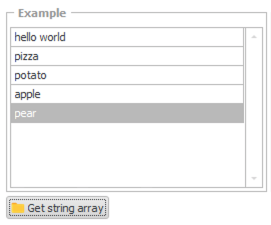
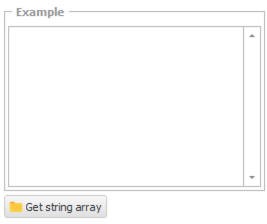
A form like the one defined above, could look like this.
When starting the application:
After clicking the button: