A BooleanArray Method Call is a Complex Method Call that returns a BooleanArray.
The example exists of an Operation and a Form. In the operation the Entity Collection(s) and Dataview(s) are defined. The definitions of Lists and Method Call(s) for composing the data, based on input from the user, are also defined in the Forms.
protected override IForm CreateStartupForm()
{
   return new BooleanArrayMethodCallDemoFrm(this);
}

public IEntityCollection<BooleanArrayMethodCallDemoEntity> BooleanArray
{
   get { return Property(() => new VolatileTable("boolean array").Select<BooleanArrayMethodCallDemoEntity>().All()); }
}

public IDataView<BooleanArrayMethodCallDemoEntity> BooleanArrayView
{
   get { return Property(() => BooleanArray.ToView()); }
}

public IEntityCollection<ArticleEntity> Articles
{
    get { return Property(() => Db.Article.Select<ArticleEntity>().All()); }
}
BooleanArrayMethodCallDemoEntity is defined elsewhere. Type 'Volatile Table' in the Search box to read more about the working of the Volatile Table.BooleanArrayMethodCallDemoEntity is also used in the Form below, on line 14.Note: In this example, a Volatile Table is used. It is also possible to make a BooleanArray based on a Database Table.
public BooleanArrayMethodCallDemoFrm(BooleanArrayMethodCallDemoOp operation) : base(operation)
{

}

protected override IUIElement CreateGui()
{
   return new VBox
   {
       new HBox
       {
           new GroupBox("example",2, alignV:AlignV.Top)
           {
               new DataGrid<BooleanArrayMethodCallDemoEntity>(Operation.BooleanArrayView, showColumnHeaders:false)
               {
                   e => new CheckColumn(e.Value)
               }
           }
       },

       new HBox(alignH:AlignH.Fill)
       {
           new Button(GetBooleanArray()),
           EmptySpace.FillH,
           new Button(Close())
       }
   };
}

private BooleanArray ComposeBooleanArray()
{
   return Method(() =>
   {
       return new Body
       {
           new Return(new BooleanArray(Operation.Articles.Select(f => f.Active).ToBooleanArray()))
       };
   });
}

private IMethodCall GetBooleanArray()
{
   return Method(() =>
   {
       var newArrayItem = Operation.BooleanArray.CreateItemReference();
       return new Body
       {
           Operation.BooleanArray.DeleteAll(),
           array.Assign(ComposeBooleanArray()),
           array.Foreach(arrayItem => new Body
           {
               newArrayItem.Assign(Operation.BooleanArray.New()),
               newArrayItem.Value.Assign(arrayItem)
           })
       };

   })
   .SetWorkDescription("get boolean array")
   .SetImage(WikiImages.Directory)
   .Call();
}
Warning:
All Method Calls and Complex Method Calls need a new Return(). They are like C# functions that need a return type.
The exception is an IMethodCall. In C# this is like a void method.
BooleanArray. In it, the list is composed and returned (line 36). This BooleanArray was defined in the Operation as a Volatile Table.BooleanArray is done with the function .ToBooleanArray that collects the records collected with the Select.BooleanArray on line 45.BooleanArray is assigned to an array. By looping through this array (line 50) the items are assigned (line 52-53).A form like the one defined above, could look like this.
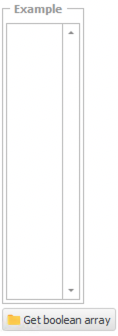
When starting the application:
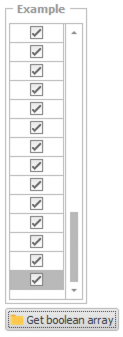
After clicking the button:
Article ID: 439
Created: Fri, Mar 27, 2020
Last Updated: Tue, Mar 31, 2020
Online URL: https://wiki-ai-framework.abstract-it.nl/article/booleanarray-method-call-439.html